
ONBOARDING WORKFLOW BUILDER
Your compliance team builds the onboarding journey. No developer required.
A no-code builder for eKYC onboarding flows that your operations team configures, adjusts, and deploys directly, without a ticket, without a sprint, and without waiting.
Every organisation has different verification requirements. A bank onboarding NRI customers needs different steps to a university enrolling international students. A government agency verifying pensioners needs a different flow to a FinTech opening payment accounts. The Daksam Analytics Workflow Builder gives your compliance and operations team the tools to build the exact flow their regulation requires and change it the same day a requirement shifts. No developer. No delay. No compromise between what your regulator needs and what your vendor will build.
THE CHALLENGE
Every Workflow Change Should Not Need
a Developer
Compliance requirements change. Regulations update. New document types get introduced. In most organisations, every one of these changes requires a developer ticket, a sprint, and a wait. By the time the change is deployed, the requirement has moved again.
HOW IT WORKS
Build the Flow Once. Adjust It Whenever You Need To.
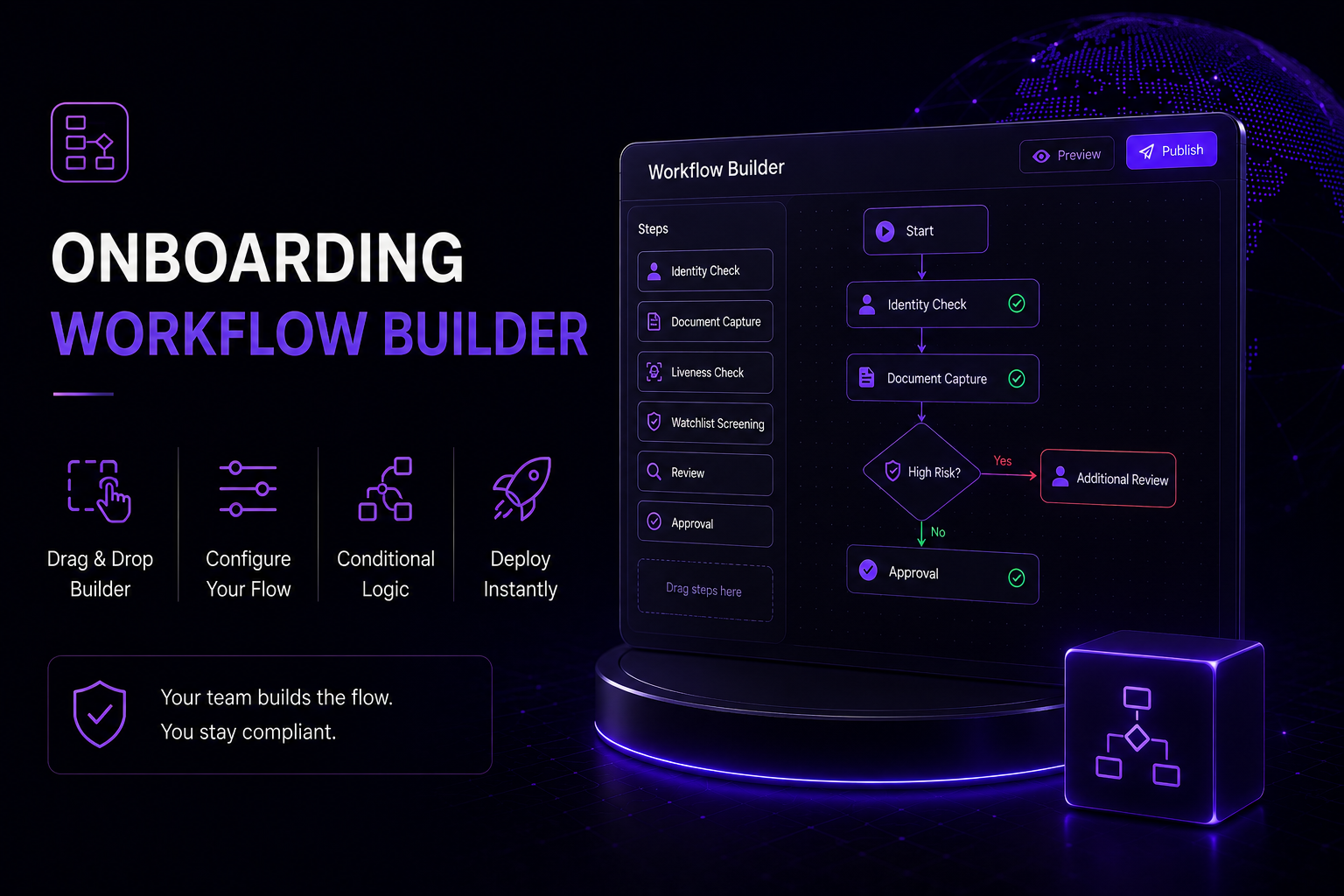
The Workflow Builder is the configuration layer of the Daksam Analytics eKYC platform. Your compliance or operations team opens it, assembles the verification steps their regulation requires, sets the rules for each step, and publishes. The flow is live immediately. When a requirement changes, they open it again, make the adjustment, and publish again. No ticket. No wait.
Select Your Steps
Choose from the available eKYC verification steps: document capture, OCR, liveness detection or selfie upload, face match, and watchlist screening.
Set the Order
Arrange the steps in the sequence that fits your onboarding journey and your regulatory requirement. Reorder at any time without rebuilding the flow from scratch.
Configure the Steps
Set which documents are accepted at each step and whether liveness detection runs or switches to selfie upload. Your team controls what each step requires.
Publish Directly
Your operations team publishes the flow directly from the builder. No developer review, no release cycle, no waiting for a deployment window.
Adjust When Requirements Change
When a regulation updates or a new document type is added, open the builder, make the change, and publish. The updated flow is live immediately across every channel.
PLATFORM CAPABILITIES
Everything Your Operations Team Needs to Build and Run Onboarding Flows
Every capability below is available inside the Workflow Builder. Your compliance and operations team uses them directly. No technical knowledge required to configure, publish, or adjust any of them.
Step Configuration
Add, remove, and reorder eKYC verification steps directly in the builder. Document capture, OCR, liveness, face match, and watchlist screening are all individually configurable.
Liveness Toggle
Switch liveness detection on or off per flow. When switched off, the step is automatically replaced with a selfie upload, keeping verification running in low-connectivity environments.
Document Rules
Define which document types are accepted at each step. Domestic and international document formats handled within the same flow.
Step Controls
Set which document types are accepted and whether liveness detection or selfie upload runs at each step. Applied consistently across every customer in the flow.
Same-Day Deployment
Every change made in the builder goes live the moment it is published. No deployment window, no developer sign-off, no gap between the change and the customer experiencing it.
Audit Trail Integration
Every verification decision made in your configured flow writes to an immutable blockchain record automatically. No separate setup required.
WHAT YOUR TEAM CONTROLS
The Compliance Team Sets the Rules. The Platform Enforces Them.
The Workflow Builder puts the onboarding flow in the hands of the people who understand the compliance requirement, not the people who can write code. Everything below is configured directly by your compliance or operations team with no technical involvement required.
Verification Step Selection
Your team selects exactly which eKYC steps run in your flow and which do not. Nothing runs that you have not explicitly included and configured.
Step Sequencing
Your team sets the order steps run in. If your regulation requires consent before document capture, or document capture before liveness, you set that sequence directly.
Document Acceptance
Your team defines which document types are accepted at each verification step. Different acceptance settings for domestic and international customers within the same flow.
Flow Versioning
Every published version of your flow is recorded. Your team can see what changed, when it changed, and who made the change, giving you a full history of every configuration decision.
WHY CHOOSE US
Built for compliance. Designed for scale.
Four reasons compliance and operations teams choose the Daksam Analytics Workflow Builder to run onboarding flows they control without depending on developers.
No Developer Dependency
Your compliance team builds, adjusts, and publishes the onboarding flow without raising a single developer ticket. When a regulatory requirement changes, your team makes the change directly and it goes live immediately. The bottleneck between compliance knowledge and compliance implementation is removed entirely.
- Compliance team publishes flow changes the same day a requirement shifts.
- No developer ticket, no sprint, no deployment window required.
- Operations team has full visibility and control over every step.
Built Around Your Regulation
The Workflow Builder was designed for organisations that operate under specific regulatory requirements, not generic onboarding standards. The steps, the document rules, and the review triggers are all configurable to the exact requirements of your regulator, your market, and your institution type.
- Flow configured to your specific regulatory framework, not a template.
- Different flows for different customer types within the same platform.
- Document acceptance settings configured per market and per customer segment.
Audit-Ready by Default
Every verification decision made in your configured flow writes to an immutable blockchain record automatically. Your operations team does not need to do anything additional to produce an audit-ready record for every onboarding decision.
- Every verification decision in your configured flow writes to the blockchain audit trail.
- Immutable record of every verification decision made in your flow.
- Full audit history available for regulatory inspection at any point.
Part of the Platform
The Workflow Builder is not a standalone product. It is the configuration layer of the Daksam Analytics eKYC platform. The flows your team builds in the builder run on the same platform as document OCR, liveness detection, face matching, watchlist screening, and blockchain audit trail generation. One platform, one integration, your team in control.
- Runs inside the same platform as eKYC, VCIP, and Fraud Engine.
- Configured flows use all available eKYC verification capabilities.
- Single integration covers the full onboarding flow your team builds.
FAQ
What compliance and operations teams ask about the Workflow Builder.
The Daksam Analytics Workflow Builder is the no-code configuration layer of the eKYC platform. It is designed for compliance officers, operations directors, and onboarding managers who need to build and adjust verification flows without involving a developer. Your team selects the eKYC steps their regulation requires, sets the rules for each step, and publishes the flow directly. When a regulatory requirement changes or a new document type needs to be added, your team makes the change and publishes again. No technical knowledge is required at any stage of configuration or deployment.
The steps available to configure are document capture, document OCR, liveness detection or selfie upload, face match, and watchlist and AML screening. Each step can be included or excluded from the flow independently. Liveness detection can be switched off and replaced with a selfie upload automatically, which is useful for customer segments or markets where passive liveness detection creates friction or performs inconsistently due to connectivity conditions.
Immediately. Changes made in the Workflow Builder go live the moment your team publishes them. There is no deployment window, no developer review process, and no release cycle between the change and the customer experiencing it.
Yes. The Workflow Builder supports multiple flows within the same platform instance. An NRI account opening flow can have different steps to a domestic savings account flow. A student enrolment flow can have different requirements to a corporate onboarding flow. Your team builds and manages each flow independently from the same builder interface.
Yes, automatically. Every verification decision made in any flow your team configures writes to an immutable blockchain record at the moment it is made. Your team does not need to configure the audit trail separately. It is built into the platform and runs on every flow by default.
It is part of the platform. The Workflow Builder is the configuration layer of the Daksam Analytics eKYC platform, not a standalone product. The flows your team builds in the builder run on the same platform as document OCR, liveness detection, face matching, watchlist screening, fraud risk scoring, and blockchain audit trail generation. You access it through the same platform instance as every other Daksam Analytics capability. There is no separate integration required.
See What Onboarding Looks Like When Your Compliance Team Controls the Flow
Most demos walk you through someone else’s workflow on a generic platform. Ours is different. We show you your compliance team building your onboarding flow, with your document types and your regulatory rules, running live on Daksam Analytics infrastructure. Book 30 minutes and come with your use case.